How to Fine-Tune
What is Fine-Tuning?
Fine-tuning means taking a pre-trained language model—something that already learned English from millions of examples—and training it further to match a particular writing style you choose.
You can do this with just about 100 examples. If you haven’t, see ❓How to Prepare your Dataset
Getting Started
The first step to fine-tune a language model… is finding a language model!
We'll use DistilGPT2, a simplified and smaller version of GPT-2: the popular language model developed by OpenAI in 2019.
DistilGPT2 is a Text Generation Model, which you can find on 🤗 HuggingFace: an online platform hosting models and datasets.
You can tell it's small by looking at the size of its .safetensors file [see image].
To fine-tune DistilGPT2, you'll use Python (a programming language) and a few specialized tools available through Google Colab, Google's online coding platform.

If you don't have an account yet, create one on Google Colab.
Make sure your dataset (text you wrote or collected) is ready. If you haven't prepared it yet, check out ❓How to Prepare your Dataset
Open the code in Google Colab
Here’s the full notebook code you’ll use:
 https://colab.research.google.com/drive/1uvr_fEyJvihbeZB-E_dI9UQPPN7T-RM9?usp=sharing
If you know Google Colab already, run the code directly. Otherwise, follow the steps below carefully.
Make a copy in your Drive
After opening our code notebook on Google Colab, you’ll see "cells" of text and code.
You can't edit this notebook directly because it's shared from my account. First, click File → Save a copy in Drive. This opens your own editable copy.

🥗 Prepare the Project
Run each code-cell by clicking the PLAY button.

Install Packages
First, install Python packages (tools):
!pip install -U transformers[torch] tf-keras datasetsThis installs:
- transformers (for language models)
- torch (helps models learn)
- tf-keras (extra tools for AI)
- datasets (manages your text data)
⌛ Time: 5-6 minutes — time to download packages
Import Libraries
From the packages we installed, we need to import a few libraries.
fileslets you upload your text.
load_datasethelps Python read your text.
transformerstools help the model learn from your text.
from google.colab import files
from datasets import load_dataset
from transformers import (
	AutoTokenizer,
	AutoModelForCausalLM,
	DataCollatorForLanguageModeling,
	Trainer,
	TrainingArguments,
	)
⌛ Time: 1 minute
Upload your Gossip
Upload your text file (.txt) containing your sentences:
uploaded = files.upload()
filename = list(uploaded.keys())[0]
Click Browse…, select your file, and confirm it's uploaded on the left 📁 icon.
Note → Your file must be .txt.

🥸 Format your Dataset
Convert the Gossip file into a Training Dataset
Tell Python your file is your training data:
data_files = {"train": filename}
ds = load_dataset("text", data_files=data_files)
⌛ Time: immediate
Download Tokenizer and Model
Our dataset of words won’t do much. We need to convert it into numbers through a process called tokenization. This process converts words like I heard that into numbers like 40, 1045, 1115, which the model can understand.
DistilGPT2 has a built-in tokenizer. We can download it using AutoTokenizer.from_pretrained()
After loading the tokenizer, we load DistilGPT2 with AutoModelForCausalLM.from_pretrained().
Note → Models bigger than DistilGPT2 will download slower.

tokenizer = AutoTokenizer.from_pretrained("distilgpt2")
tokenizer.pad_token = tokenizer.eos_token

model = AutoModelForCausalLM.from_pretrained("distilgpt2")
model.config.pad_token_id = model.config.eos_token_id
⌛ Time: < 1 minute — depends on download time
Tokenize your Dataset
Convert text to numbers (tokens). You tokenize your dataset into smaller groups (batches) of words (tokens), so the model learns effectively without overwhelming the computer.
def tokenize_batch(batch):
    return tokenizer(
        batch["text"],
        truncation=True,
        max_length=64,
        padding="max_length",
    )

tokenized = ds["train"].map(tokenize_batch, batched=True, remove_columns=["text"])
⌛ Time: few seconds — depends on batch and dataset size
Create the Data Collator
To tidy up our dataset, we do a process called padding, which adds [blank] spaces to sentences that are shorter than the rest.
"she failed exams"→"she failed exams [blank] [blank] [blank] [blank] [blank]"
"yesterday I saw my neighbor kissing someone new" → stays as-isWe do this now, with a Data Collator: a function that takes a bunch of sentences, makes sure they are all the same size (by padding short ones), puts them together into a batch, and prepares them for the model.
data_collator = DataCollatorForLanguageModeling(tokenizer=tokenizer, mlm=False)⌛ Time: immediate
🍰 Prepare the Training
Indicate Training Instructions
Give the training process instructions.
We are going to try a “fast but soft” example for this exercise (on the left).
For the real training, use the “slow but strong” example (on the right).
training_args = TrainingArguments(
    output_dir="./distilgpt2-finetuned",
    overwrite_output_dir=True,
    num_train_epochs=3,
    per_device_train_batch_size=8,
    learning_rate=1e-5,
    weight_decay=0.01,
    logging_steps=10,
    save_steps=100,
    save_total_limit=2,
    fp16=True,
    report_to=["none"]
)
training_args = TrainingArguments(
    output_dir="./distilgpt2-finetuned",
    overwrite_output_dir=True,
    num_train_epochs=500,
    per_device_train_batch_size=8,
    learning_rate=1e-6,
    weight_decay=0.01,
    logging_steps=20,
    save_steps=100,
    save_total_limit=2,
    fp16=True,
    report_to=["none"],
    gradient_accumulation_steps=2,
	  warmup_steps=50,
    max_grad_norm=1.0,
)
You want to look at two instructions, in particular:
Number of Epochs
num_train_epochs=3 → goes over the entire dataset 3 times. You can bring this up to 10-50 for a 100-500 lines dataset. The smaller the dataset, the more the epochs.Increasing this value increases the time of training. You can start with 3, see the results, then go up until it’s good enough.
Learning Rate
learning_rate=1e-5 → indicates how “aggressively” the model updates what it knows. A value too low makes the learning very slow but more precise.You can try 5e-5 or 2e-5 if you want faster learning at first.
Note → Google Colab’s free tier limits your usage to approx. 3h30m.
⌛ Time: immediate — we are just giving instructions. Not training, yet.
Feed the Instructions to the Trainer
Hand everything (model, instructions, dataset) to the trainer:
trainer = Trainer(
    model=model,
    args=training_args,
    train_dataset=tokenized,
    data_collator=data_collator,
)
⌛ Time: immediate
🏃♂️Train!
Run Trainer and Save Model
That’s it! Now sit back, start training and save your fine-tuned model:
trainer.train()

trainer.save_model()
⌛ Time: variable — depends on training arguments (15 minutes to 3 hours)
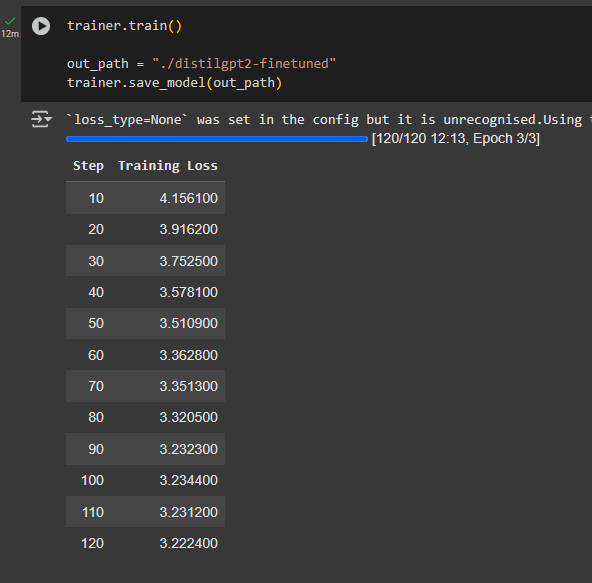
While you train, you can visualise the progress by looking at the steps. The amount of steps depends on both the amount of epochs and the size of batches.
Every 10 steps, you can see the Training Loss: the smaller this is the more accurately your model is learning.
Prepare the Model for Download
Once saved, you can see your model’s folder on the side, by clicking on the 📁 icon:
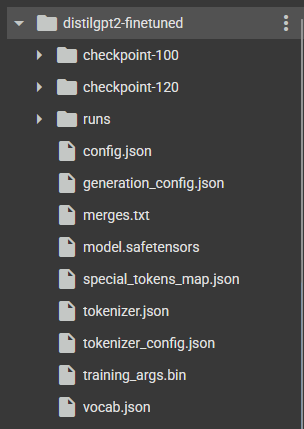
In order to download it, you need to run a command that “zips” the folder into one file.
!zip -r distilgpt2-finetuned.zip distilgpt2-finetuned⌛ Time: 2-3 minutes
Download the Model
Finally, download the model!
files.download("distilgpt2-finetuned.zip")This will execute quickly, but the actual download will take a lot longer. You can check the progress under the code-cell.

Once the bar is loaded fully, make sure you accept the download in your browser.

⌛ Time: 15-20 minutes — depends on file size
Now that you have a model, let’s infer it! ❓How to Infer